sdplane Releases
Download
Debian packages for Ubuntu 24.04. Both libsdplane and sdplane are required.
- libsdplane 0.3.37-121 [deb]
- sdplane 0.1.3-943 [deb]
- Configuration file (minimal switch configuration) [sdplane-switch.conf]
Prerequisites
- CPU: x86-64-v2 or later (amd64)
- OS: Ubuntu 24.04 LTS
- NIC: A DPDK-capable NIC. Most NICs are supported, including Intel and NVIDIA (Mellanox) NICs. For other NICs, check the DPDK supported NICs list. sdplane takes over the NICs specified in the configuration, so do not specify the Linux interface used for management.
- Memory: 16GB or more
- IOMMU: Enable VT-d / AMD-Vi in the BIOS (required by the vfio-pci driver).
Installation and Setup
-
Install the packages. sdplane.service is enabled automatically.
sudo apt install ./libsdplane_0.3.37-121~ubuntu24.04_amd64.deb \
                 ./sdplane_0.1.3-943~ubuntu24.04_amd64.deb
The DPDK 23.11 libraries (librte-*), liburcu and libpcap are installed automatically as dependencies, along with the recommended dpdk package (NIC drivers and tools such as dpdk-devbind.py).
-
Configure hugepages. Add the following to
/etc/default/gruband update grub.GRUB_CMDLINE_LINUX="default_hugepagesz=1G hugepagesz=1G hugepages=8"sudo update-grub -
Load the vfio-pci driver at boot.
sudo cp /etc/sdplane/vfio-pci.conf /etc/modules-load.d/ -
Download
sdplane-switch.conf, the minimal configuration for a switch, and place it as/etc/sdplane/sdplane.conf. Then edit the PCI addresses in theset devicelines to match your system. Uselspcito find the PCI addresses.wget https://www.yasuhironet.net/dist/sdplane-switch.conf sudo mv sdplane-switch.conf /etc/sdplane/sdplane.conf sudo vi /etc/sdplane/sdplane.conf⚠️ If you specify the PCI address of an NVMe SSD by mistake, the system will fail to boot. Double-check the PCI addresses.
-
Reboot, and sdplane starts. Connect to the CLI with telnet.
sudo reboot
telnet localhost 9882
⚠️ The CLI has no authentication. Allow connections to 9882/tcp only from localhost.
Minimal Switch Configuration
sdplane-switch.conf is a minimal configuration that runs sdplane as a 4-port switch.
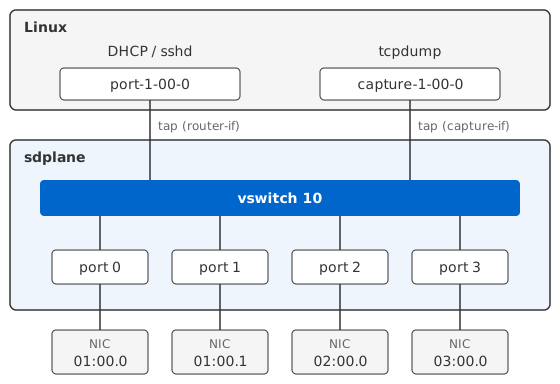
The four NICs at PCI addresses 01:00.0, 01:00.1, 02:00.0 and 03:00.0 are connected to vswitch 10, which operates as a 4-port switch.
vswitch 10 also has two tap interfaces, port-1-00-0 and capture-1-00-0. From Linux, you can obtain an address with DHCP on port-1-00-0 and provide ssh, and run tcpdump on capture-1-00-0 to monitor packets.
Common Commands
Run these after connecting to the CLI with telnet.
telnet localhost 9882show port- Lists each port's device (PCI address), link status, speed, driver and uptime.
show port statistics pps- Shows received and transmitted packets per second and error counts for each port.
show thread- Shows the lcore, type (lthread / dpdk), function and loops per second of each thread.
show vswitch- Shows each vswitch's VLAN, attached ports, and the router-if and capture-if tap interfaces.
Documentation
English | 日本語 | Français | 中文 | Deutsch | Italiano | 한국어 | ไทย | Español